Core Web Vitals in 2026: A Practical Guide to Fixing INP, LCP and CLS
A practical 2026 guide to Core Web Vitals — what good INP, LCP and CLS scores are, how to measure them with real-user data, and the fixes that work on WordPress, Shopify and custom sites.
by Pradeep Rajpurohit4 min read
Your website can look beautiful and still lose customers because it feels slow. Google measures that feeling with three numbers called Core Web Vitals, and they are part of how it ranks pages.
Since March 2024, the responsiveness metric is INP (Interaction to Next Paint), which replaced the old FID. INP is much stricter — and it is where a lot of WordPress and Shopify sites still struggle in 2026.
Here is what the numbers mean and how to fix each one.
The three metrics and their thresholds
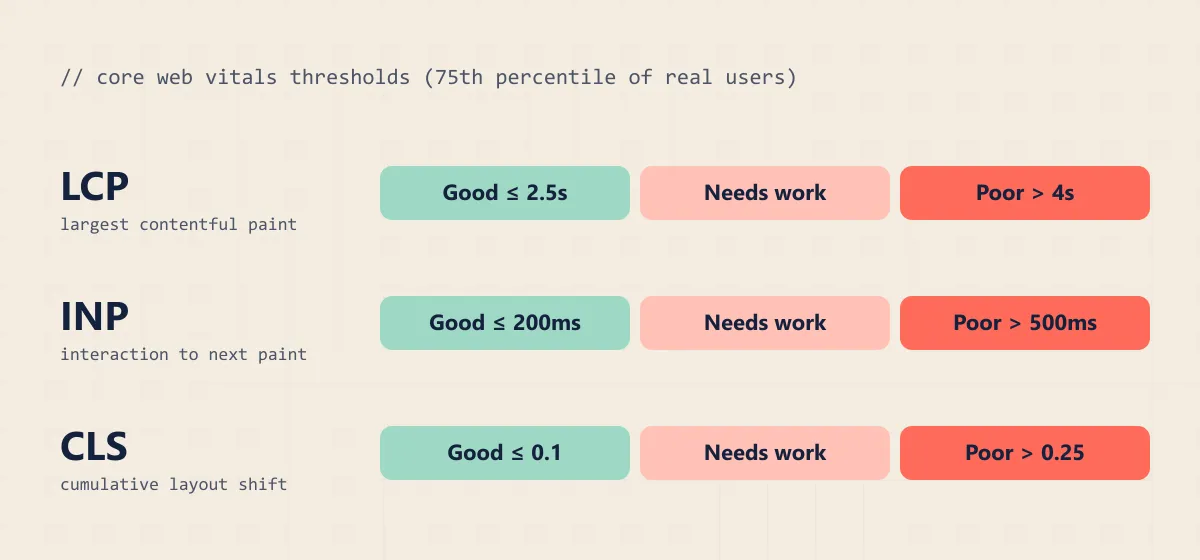
- LCP — Largest Contentful Paint: how long until the main content (usually the hero image or headline) is visible. Good is 2.5 seconds or less.
- INP — Interaction to Next Paint: how quickly the page visibly reacts when someone taps, clicks or types. Good is 200 ms or less.
- CLS — Cumulative Layout Shift: how much the layout jumps around while loading. Good is 0.1 or less.
Google looks at the 75th percentile of real visitors, separately for mobile and desktop. So it is not enough for the page to be fast on your office Wi-Fi — it has to be fast on a mid-range Android phone on 4G.
Measure with real-user data first
Before fixing anything, find out what real visitors experience:
- Google Search Console → Core Web Vitals report shows which groups of URLs fail and which metric is the problem.
- PageSpeed Insights — read the top section, “Discover what your real users are experiencing”. The big score below it is only a lab simulation.
- For deeper debugging, the Chrome DevTools Performance panel shows your own live Core Web Vitals and which interactions are slow.
How to fix INP
INP is almost always a JavaScript problem. When the browser’s main thread is busy running scripts, it cannot respond to a tap.
- Audit third-party scripts. Chat widgets, multiple analytics tags, heatmaps, popups and review widgets are the usual culprits. Remove what you do not use and delay the rest until after the page is interactive.
- On Shopify: every app can inject JavaScript on every page. Uninstalling an app does not always remove its code — check
theme.liquidand app embeds for leftovers. - On WordPress: heavy page builders and “all-in-one” plugins load large scripts everywhere. Load scripts only on the pages that need them, and avoid stacking several sliders or animation libraries.
- Break up long tasks. If you write custom code, split heavy work into smaller chunks and give the browser a chance to respond in between (for example with
scheduler.yield()where supported, orsetTimeout). - Give instant feedback. Show the button’s pressed state or a loading indicator right away, then do the heavy work.
How to fix LCP
LCP is usually about the hero image and the server.
- Do not lazy-load the hero image. Lazy-loading is great for images further down, but the main image should load immediately — add
fetchpriority="high"to it. - Serve modern formats and correct sizes. WebP or AVIF, with
srcsetso phones do not download a desktop-sized image. - Improve server response (TTFB). Use good hosting, page caching and a CDN. On WordPress, a caching plugin plus a CDN often halves LCP on its own.
- Avoid hero sliders. Carousels delay the main content and rarely get clicked anyway.
- Load fonts carefully. Self-host fonts, preload the one used above the fold and use
font-display: swap.
How to fix CLS
Layout shift happens when something appears without a reserved space.
- Always set width and height (or
aspect-ratio) on images, videos and iframes. - Reserve space for ads, cookie banners and announcement bars instead of pushing content down when they load.
- Avoid inserting content above existing content after load, unless the user asked for it.
- Use fallback fonts with similar metrics so text does not jump when the web font arrives.
A realistic order of work
If you only have a day, do this:
- Remove unused apps, plugins and third-party scripts.
- Fix the hero image: right size, modern format, no lazy-loading,
fetchpriority="high". - Add caching and a CDN.
- Add dimensions to every image and embed.
- Re-check field data in Search Console after 28 days.
That usually moves a site from “poor” to “needs improvement” or “good”. Getting all the way to excellent sometimes means rebuilding the theme or front end with performance in mind — which is why we build on fast, static-first stacks. If you are weighing that decision, our comparison of Astro, WordPress and Shopify will help.
Need help passing Core Web Vitals? Our website development and maintenance services include performance work — contact us for a speed audit.
Frequently asked questions
What are good Core Web Vitals scores in 2026?
LCP of 2.5 seconds or less, INP of 200 milliseconds or less, and CLS of 0.1 or less — measured at the 75th percentile of real visits on both mobile and desktop.
Do Core Web Vitals affect Google rankings?
Yes, as part of Google's page experience signals. They are not stronger than relevant, helpful content, but when competing pages are similar, a faster site has an edge — and it almost always converts better.
Why is my PageSpeed Insights score different from Search Console?
The big score in PageSpeed Insights is a lab test on a simulated device. Search Console uses field data from real Chrome users over 28 days. Google ranks on field data, so trust Search Console and the 'Discover what your real users are experiencing' section.
What is the most common cause of poor INP?
Too much JavaScript running on the main thread — usually third-party scripts like chat widgets, tag managers, heatmaps and app embeds, or large page-builder and theme bundles.
- #core web vitals
- #inp
- #page speed
- #wordpress
- #shopify